
-
vendredi, 16 octobre 2026
What’s new in the Ubuntu 26.10 flavours?
Alongside the main edition, Ubuntu 26.10 brought new releases of community flavours, including Kubuntu, Xubuntu and a welcome return of Ubuntu MATE. All of Ubuntu’s official flavours share the same foundations as the main release, with the Linux 7.3 kernel, Mesa 26.2 graphics drivers, updated tooling and support for installing snap packages from the Snap Store. Read on for an overview of the key changes in some of the most popular Ubuntu flavours, and downloads links to grab an ISO if you feel like sampling one them first-hand. Ubuntu 26.10 Flavour Recap Xubuntu 26.10 Xubuntu 26.10 ships with Xfce 4.20, […] You’re reading What’s new in the Ubuntu 26.10 flavours?, a blog post from OMG! Ubuntu. Do not reproduce elsewhere without permission. … -
vendredi, 16 octobre 2026
Microsoft Defender is now available on Linux desktops
Microsoft Defender is now available for Linux desktops. Shocked? In 2026, you shouldn’t be. Microsoft’s down with the penguins these days: there’s a Linux kernel in Windows, it owns GitHub and makes Edge for Linux (not that too many people use it). Why not some rootin’-tootin’, threat-detectin’ n’ virus-protectin’ software on top, eh? Name: Microsoft Defender for Linux. Age: Public preview, so, pass? Appearance: A line item on an E5 invoice. What is it? Microsoft’s security suite, now available for Linux desktops (albeit in a public preview). Microsoft’s security suite. On Linux…. Where have you been? Defender has been available for Linux servers […] You’re reading Microsoft Defender is now available on Linux desktops, a blog post from OMG! Ubuntu. Do not reproduce elsewhere without permission. … -
jeudi, 15 octobre 2026
Ubuntu 26.10 is out with GNOME 51, Linux 7.3 & new tiling trick
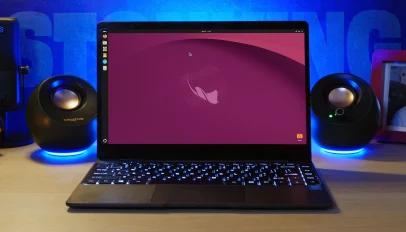 Ubuntu 26.10 brings a faster way to tile windows, Entra ID passkey login, PDF signatures and a full set of Rust-based core utilities. Here’s what’s new.
You’re reading Ubuntu 26.10 is out with GNOME 51, Linux 7.3 & new tiling trick, a blog post from OMG! Ubuntu. Do not reproduce elsewhere without permission.
-
mercredi, 14 octobre 2026
KDE Plasma 6.8 release marks project’s 30th anniversary
KDE Plasma 6.8 has been released, arriving on the 30th anniversary of the free, open-source desktop environment’s founding. Changes are, as you’d expect, varied across the stack. A new backup tool, Kup, is included as part of Plasma 6.8 to make automated backups to external media easier, while Spectacle, the screenshot and screen capture tool, is now able to record system audio and microphone alongside screen contents. When running the Steam desktop client, it now renders shadows and rounded corners for better visual consistency with other apps run-on the desktop. Accessibility is boosted by a new ‘click dwell’ option to […] You’re reading KDE Plasma 6.8 release marks project’s 30th anniversary, a blog post from OMG! Ubuntu. Do not reproduce elsewhere without permission. … -
mardi, 13 octobre 2026
ONLYOFFICE 10.0 is a ‘fully rebuilt app’ with more AI tools
A new version of free, open-source productivity suite ONLYOFFICE is out, bringing more than a thousand bug fixes and an expanded set of AI features. ONLYOFFICE Desktop Editors v10.0 is billed as a “fully rebuilt app”, and the developers warn those upgrading from earlier versions that not all of their settings and preferences will transfer over. Notably, its AI integrations are no longer included as a plugin that ships with the app. Inside, AI features in ONLYOFFICE 10.0 are provided via a separate AI Tools add-on. This needs to be downloaded and installed (the app has a flow for that). […] You’re reading ONLYOFFICE 10.0 is a ‘fully rebuilt app’ with more AI tools, a blog post from OMG! Ubuntu. Do not reproduce elsewhere without permission. … -
mardi, 13 octobre 2026
Linux Mint 27 ‘Adrien’ due this Christmas with MORE new apps
Linux Mint shook up its release schedule this year and now it’s shaking up its versioning scheme as well – the next major release won’t be Linux Mint 23, but Linux Mint 27. Releases will now be numbered by year. Linux Mint 27 will be followed by v28, and so on. The release also sees the start of a new series of release codenames. Mint has traditionally used feminine first names, cycling through the alphabet from Linux Mint 1.0 ‘Ada’ in 2006 through to Linux Mint 22.3 ‘Zena’ in 2026. The series returns to ‘A’ with Linux Mint 27 and […] You’re reading Linux Mint 27 ‘Adrien’ due this Christmas with MORE new apps, a blog post from OMG! Ubuntu. Do not reproduce elsewhere without permission. … -
lundi, 12 octobre 2026
NexPhone, the multi-OS smartphone, delayed until 2027
The multi-OS NexPhone went up for pre-order at the start of 2026, 14 years later than initially planned. Fitting, then, to hear the handset’s arrival has been delayed until 2027. Nex Computer CEO Emre Kosmaz says devices won’t begin shipping until March 2027 because of issues with antenna placement and casing issues. Given that it took 14 years for this to go from vapourware to tangible product, I doubt long-time fans of the concept will see a delay from Q3 2026 to Q1 2027 as a comparative blink of the eye. While they sort out the the hardware snags, work […] You’re reading NexPhone, the multi-OS smartphone, delayed until 2027, a blog post from OMG! Ubuntu. Do not reproduce elsewhere without permission. … -
lundi, 12 octobre 2026
Ubuntu 27.04 codename revealed as ‘Tenacious T-Rex’
Canonical has confirmed the codename of next year’s Ubuntu 27.04 release as Tenacious T-Rex. It follows Ubuntu 26.10 Stonking Stingray, which is out on 15 October, both sequentially and alphabetically. The previous T release was Ubuntu 14.04 LTS Trusty Tahr. Quite a contrast in creature between the two, no? As you likely know, every Ubuntu release has an alliterative codename coupling combining an adjective with an animal (or, on rare occasions, a mythological beast like a minotaur, werewolf or jackalope). The first part of the codename is not fluff, but a critical label used to distinguish and keep the backend […] You’re reading Ubuntu 27.04 codename revealed as ‘Tenacious T-Rex’, a blog post from OMG! Ubuntu. Do not reproduce elsewhere without permission. … -
lundi, 12 octobre 2026
Ubuntu releases tech preview of Myna, its AI voice dictation tool
 Canonical announce that Myna, its AI-powered speech-to-text tool for Ubuntu desktop, is available to install as a technology preview.
You’re reading Ubuntu releases tech preview of Myna, its AI voice dictation tool, a blog post from OMG! Ubuntu. Do not reproduce elsewhere without permission.
-
lundi, 12 octobre 2026
Firefox 158 released with JPEG XL support
Firefox 158 is now available to download, providing out-of-the-box support for JPEG XL images. JPEG XL is said to have better compression than other image formats, including WebP, PNG and regular ol’ JPEG. It supports wider colour gamut, HDR and high bit-depth, as well as animation, alpha channels and lossless and progressive encoding. Mozilla has spent several months testing JPEG XL support in Firefox, providing an opt-in toggle to try it out via the browser’s Labs page. Other changes and fixes Firefox’s Smart Window, the AI-powered browsing mode that uses a cloud-based provider like OpenAI and Alibaba to help you […] You’re reading Firefox 158 released with JPEG XL support, a blog post from OMG! Ubuntu. Do not reproduce elsewhere without permission. … -
dimanche, 11 octobre 2026
Ubuntu’s App Center makes it easy to install missing media codecs
Ubuntu 26.10’s new Add-ons page in App Center can now install restricted media codecs as well as hardware drivers. The new flow should make things simpler for those who don’t select the opt-in to “install restricted codecs” in the Ubuntu OS installer (not everyone thinks they need it) and for those who install without an active internet connection, as that box is greyed out. While apt makes it easy to get the relevant codecs if you know the right gstreamer-* , App Center doesn’t show system or library packages in search results (and “media codecs” is a bit of a […] You’re reading Ubuntu’s App Center makes it easy to install missing media codecs, a blog post from OMG! Ubuntu. Do not reproduce elsewhere without permission. … -
samedi, 10 octobre 2026
Ubuntu now has official desktop images for RISC-V
Installing the Ubuntu desktop on RISC-V hardware is made easier with 26.10, as Canonical is now building official riscv64 desktop images. Experimental versions of the upcoming Ubuntu 26.10 release are out for testing on a SpacemiT K3 – the board Canonical has been working on with SpacemiT. One ISO ships the standard GNOME desktop, and the other is built around Xubuntu minimal. Canonical’s Valentin Haudiquet says both of the ISOs are “experimental” and “carry no official support” yet. They won’t work flawlessly and do contain some issues hat be addressed in the ‘final’ versions that arrives on 15 October 2026. […] You’re reading Ubuntu now has official desktop images for RISC-V, a blog post from OMG! Ubuntu. Do not reproduce elsewhere without permission. … -
vendredi, 9 octobre 2026
The Document Foundation gets its own logo after 16 years
The Document Foundation, the non-profit steering the development of LibreOffice, has unveiled a new logo. The change means that, for the first time since its inception in 2010, TDF no longer shares the same logotype and wordmark as LibreOffice. “The Document Foundation” is now the sole wordmark, written in a different font, Inter, and a refreshed set of brand colours complement it. Unveiling the design, TDF’s Italo Vignoli made the case for a decoupling of the two brands, noting “the foundation speaks as an institution, not as a software project” whose work “extends well beyond the product” that it’s known […] You’re reading The Document Foundation gets its own logo after 16 years, a blog post from OMG! Ubuntu. Do not reproduce elsewhere without permission. … -
vendredi, 9 octobre 2026
Calibre can now read ebooks aloud without sounding like a robot
A new update to the Calibre ebook manager is out and it brings more natural sounding text-to-speech (TTS) voices, as well as AVIF image support and better handling of PDFs that put text in columns. Calibre v9.16 adds support for Kokoro, an open-weight TTS model, to its Read Aloud feature (which to state the bleedin’ obvious, will read the content of books to you). The new voices are sound to sound ‘much more natural’, especially in English. Kokoro voices aren’t preinstalled or included in Calibre itself. You choose one via the backend picker in the Read aloud configuration panel and […] You’re reading Calibre can now read ebooks aloud without sounding like a robot, a blog post from OMG! Ubuntu. Do not reproduce elsewhere without permission. … -
jeudi, 8 octobre 2026
PhotoCraft is an open-source, AI-built clone of Photoshop
It was only a matter of time before someone would point AI coding tools Photoshop and get it to build a copy. PhotoCraft is that copy – an open-source, cross-platform image editor written in Rust. The app is part of several creative tools created by the ArtCraft project, lead by Brandon Thomas, the former CEO of storyteller.ai. ArtCraft bill the app as “clean-room reimplementation of Adobe Photoshop”, and so swerve any copyright issues as it’s not reverse engineering anything (that isn’t publicly documented) – words FOSS fans will to cheered to hear. Features-wise, PhotoCraft is already well stocked despite being in […] You’re reading PhotoCraft is an open-source, AI-built clone of Photoshop, a blog post from OMG! Ubuntu. Do not reproduce elsewhere without permission. …
